Handle Tap and Pay transactions
A customer initiates a transaction when he or she taps their device on an NFC payment terminal. Open Fabric’s NFC SDK will intercept this transaction request and begin its interactions with your App. The App should then:
- Present initial transaction experience
- Perform user authentication, if needed
- Provide final confirmation to our SDK to hand over a payment token
- Present transaction in-progress experience
- Present transaction with terminal complete experience
Additionally, this document also covers ways by which your App can ensure that it is set up optimally to initiate transactions when the consumer tries to tap and pay - like for instance, set up as the default tap and pay provider, and your app is configured with appropriate foreground priority, etc.
The diagram below provides an overview of all the interactions between all the key systems/components during the interaction stage.
Handle Tap and Pay transactions
Present initial transaction experience
Whenever a user taps their phone at an NFC payment terminal, our SDK will intercept the transaction request, and will then call the onTransactionStart() callback on the NfcTransactionListener. The application will need to present the initial transaction experience to the user.
class TransactionListener: NfcTransactionListener {
  override fun onTransactionStart(context: Context) {
    PaymentActivity.displayPaymentStep(context, null)
  }
  ...
}
Please refer to the integration sample app for a complete example.
Also note that the call to your NfcTransactionListener will only happen in either of the following cases:
- The user has set up your app as the default contactless payment app
- The foreground priority is enabled, your app's activities are in the foreground and they have the implementation for foreground priority
if (!HceHelper.isDefaultNfcPaymentApp(this)) {
  if (HceHelper.isForegroundPriorityEnabled(this)) {
    HceHelper.requestForegroundPaymentPriority(this)
  }
}
Access the wallet inside a transaction callback
The NfcTransactionListener callbacks are invoked by the SDK outside of your Activity, so the Wallet instance held by your UI is often not available there. To obtain the wallet on the spot, call OfNfcSdk.getWalletManager() followed by WalletManager#getWallet().
getWallet() returns the currently provisioned wallet synchronously, or null when no wallet has been provisioned on the device yet, so there is no need to connect first and wait for onConnectionSuccess(). The WalletManagerCallback is still required by getWalletManager(), but it is only used by the asynchronous operations such as connect(). When you only need getWallet(), an empty implementation is enough.
override fun onTransactionStart(context: Context) {
  val walletManager = OfNfcSdk.getWalletManager(context, object : WalletManagerCallback {
    override fun onConnectionSuccess(wallet: Wallet) {}
    override fun onConnectionError(error: OpenFabricError) {}
    override fun onProvisioningRequired() {}
  })
  val wallet = walletManager.getWallet() ?: return

  // Your app can reject the tap here, based on your own business rules
  if (!isKycCompleted()) {
    Toast.makeText(
      context,
      "You cannot tap right now. Please complete your KYC first.",
      Toast.LENGTH_SHORT
    ).show()
    wallet.cancelOngoingTransaction()
    return
  }

  PaymentActivity.displayPaymentStep(context, null)
}
Reject or cancel a transaction
wallet.cancelOngoingTransaction() declines the transaction before any payment credentials are handed over to the terminal. It can be used in two ways:
- Synchronously from within
onTransactionStart(), to reject the tap in-flow as in the example above. The SDK checks for the cancellation as soon as your callback returns. - Out-of-band while the device is still at the reader, for example when the customer cancels on your payment screen, or when authentication fails after
onCredentialsRequired().
In both cases the SDK answers the terminal with conditions not satisfied, and calls onTransactionError() with the abort reason WALLET_CANCEL_REQUEST, so your app can present the failed transaction experience from a single place. The cancellation only applies to the current transaction, the next tap starts unaffected.
Perform user authentication, if needed
The SDK determines whether user authentication is needed based on the wallet settings. Authentication may be required in the following scenarios:
- When a certain threshold has been exceeded (authentication duration, or number of transactions) since the last authentication.
- When a payment terminal classifies a transaction as high value and requests additional authentication.
There are two ways to satisfy the authentication requirement:
Option A: Proactive authentication
Whenever your app has authenticated the user itself, you can notify the SDK by calling wallet.authenticateForTransaction(), passing the method that was used. The SDK records it as a successful authentication, exactly as if it had performed the authentication itself, and onCredentialsRequired() will not be triggered while that authentication remains valid.
This is not limited to onTransactionStart(). The call can be made at any point where your app has just verified the user, and it applies to the taps that follow. For example:
- Right after the customer logs in to your app, or re-authenticates within it.
- When your app runs its own biometric or PIN check, such as on a payment screen, before any tap has happened.
- From within
onTransactionStart(), when you know the user was already authenticated at the time of the tap.
// The user has just authenticated in your app, no tap involved yet
wallet.authenticateForTransaction(AuthenticationMethod.BIOMETRIC) // or CREDENTIAL
class TransactionListener: NfcTransactionListener {
  override fun onTransactionStart(context: Context) {
    PaymentActivity.displayPaymentStep(context, null)
    // If the user is already authenticated, signal the SDK to skip the credentials prompt
    wallet.authenticateForTransaction(AuthenticationMethod.BIOMETRIC) // or CREDENTIAL
  }
  ...
}
A recorded authentication does not satisfy authentication indefinitely. It expires under the same conditions as the SDK's own authentication, after which onCredentialsRequired() is triggered again.
Option B: Reactive authentication via onCredentialsRequired()
If proactive authentication was not performed and the SDK determines that authentication is required, the onCredentialsRequired() callback on the NfcTransactionListener will be called.
When receiving this callback, you can use our built-in helper ScreenUnlockAuthenticationPromptBuilder to authenticate the user with device biometrics, or handle authentication yourself and notify the SDK via wallet.authenticateForTransaction() (passing the method that was used, e.g. BIOMETRIC for device biometrics or CREDENTIAL for PIN/password).
class TransactionListener: NfcTransactionListener {
  ...
  override fun onCredentialsRequired(context: Context) {
    ScreenUnlockAuthenticationPromptBuilder()
            .setTitle("TITLE")
            .setSubtitle("SUBTITLE")
            .build(context)
  }

  ...
}
After successful authentication via onCredentialsRequired(), the transaction does not automatically continue. The user must tap their device to the terminal again to proceed.
From your app's perspective, this re-tap triggers a brand new onTransactionStart() callback — even if the payment terminal treats it as the same session. Because authentication was already satisfied, onCredentialsRequired() will not be triggered again for this second tap.
Invalidate a previous authentication
wallet.clearAuthenticationForTransaction() discards the last recorded authentication, whether it came from the SDK's own prompt, from authenticateForTransaction(), or from a device unlock. The next transaction that requires authentication will prompt again.
Call it whenever the authenticated context in your app ends, for example when the customer logs out, switches profile, or your app's own session expires.
// The user has logged out, earlier authentication should no longer count
wallet.clearAuthenticationForTransaction()
Present In-progress experience
While the transaction is ongoing, the SDK may call the onTransactionProgress() callback on the NfcTransactionListener to provide the payment app with updates regarding the current transaction. You should use this callback to update the UI and provide feedback to users.
onTransactionProgress() indicates that the initiated NFC transaction has successfully started transferring the payment token to the terminal.
class TransactionListener: NfcTransactionListener {
  ...
  override fun onTransactionProgress(context: Context, step: HceTransactionStep, apdu: String) {
    // Optional: update the screen showing the current step
  }

  ...
}
The callback is called with the following parameters:
| Name | Type | Description |
|---|---|---|
| context | Context | The current Context (Activity) |
| step | HceTransactionStep | The HceTransactionStep that has been completed, not null |
| apdu | String | The current APDU (Application Protocol Data Unit) value |
Provide final confirmation to our SDK to hand over a payment token
After the NFC exchange with the terminal is in progress, the transaction proceeds to the finalization stage. At this stage, you can perform any additional validation or confirmation before approving the transaction (for example: amount/currency check, account validity, transit eligibility, location-based checks). This is performed upon receiving the onTransactionFinalization() callback on the NfcTransactionListener.
This callback runs on the transaction-critical processing thread. Its implementation must be light and non-blocking — synchronous network calls or UI interactions must not be performed here.
Following is the signature of the callback:
class TransactionListener: NfcTransactionListener {
  ...
  override fun onTransactionFinalization(context: Context, transaction: NfcTransaction): TransactionDecision {
    if (notAllowed(transaction)) {
      return TransactionDecision(TransactionOutcome.DECLINE)
    }

    return TransactionDecision(TransactionOutcome.PROCEED)
  }

  ...
}
The callback is called with the following parameters:
| Name | Type | Description |
|---|---|---|
| context | Context | The current Context (Activity) |
| transaction | NfcTransaction | The current ongoing transaction |
Present transaction with terminal complete experience
Once the NFC exchange between the SDK and the payment terminal is completed for the transaction, the onTransactionDone() callback on the NfcTransactionListener will be called.
After this step the payment terminal may perform proprietary checks and in most cases it proceeds to an online authorization request to the network. The SDK simply considers the NFC exchange with the payment terminal is complete and will not be aware of decisions taken afterwards.
class TransactionListener: NfcTransactionListener {
  ...
  override fun onTransactionDone(context: Context, result: TransactionResult) {
    // Presents Transaction with terminal complete experience
  }
}
The callback is called with the following parameters:
| Name | Type | Description |
|---|---|---|
| context | Context | The current Context (Activity) |
| result | TransactionResult | The final NFC exchange result of the transaction |
If there is any error happening during the NFC exchange, for example if the customer chooses to cancel it or there is a connection issue with the terminal, the onTransactionError() callback on the NfcTransactionListener will also be called. The signature of the callback is as follows:
class TransactionListener: NfcTransactionListener {
  ...
  override fun onTransactionError(context: Context, errorCode: string, exception: OpenFabricError?) {
    // Display the error to user
  }
}
App configuration for optimal payment initiation outcome
While the basic integration with the Android platform has been covered in the Getting Started section, our NFC SDK provides additional helpers, to help you build further integration with the Android platform to optimize the customer experience thereby resulting in an optimal payment initiation outcome.
Check and request to be the default payment provider app
The SDK provides the following methods to check whether the current app is set as the default payment app and to quickly launch the setting page for users to select it as the default payment app.
Your application can use the method HceHelper#isDefaultNfcPaymentApp() to check if the app is set as the default payment app on the customer’s device. The method returns a boolean value true/false, indicating the status.
The Android Platform does not allow an application to set itself as the default payment app without customer consent. However, we provide HceHelper#launchNfcPaymentSettings() and HceHelper#launchNfcPaymentSettingsForResult() convenience methods that the app can call to open the Android Settings page for Contactless Payment App.
Payment application selection menu
Multiple payment apps can be installed on the same device and Android OS setting menu allows the customer to select a default payment app for NFC/Contactless payments. The default payment app is the app the NFC transactions are redirected to by Android system when device is tapped on an active terminal.
This settings menu presents every payment app installed on the phone, with a description and a banner, so that users can select the one to set as the default payment app.
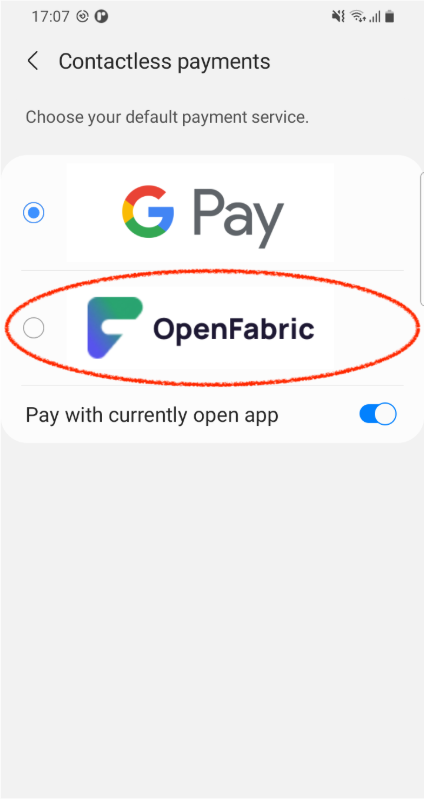
To provide your own app name and payment banner, add the following resource override in your application strings.xml:
<resources>
    ...
    <string name="tapandpayNfcDescription">Open Fabric NFC Tap and Pay Sample</string>
    <drawable name="tapandpayApduBanner">@drawable/my_payment_banner</drawable>
</resources>
The keys (tapandpayNfcDescription and tapandpayApduBanner) must be kept exactly as they are, but you can provide your own text/image as the values.
Handle transaction as non-default foreground contactless payment application
if (!HceHelper.isDefaultNfcPaymentApp(this)) {
  if (HceHelper.isForegroundPriorityEnabled(this)) {
    HceHelper.requestForegroundPaymentPriority(this)
  }
}
Disable/Enable contactless payment feature
// Disable contactless payment feature
HceHelper.disableHceService()

// Enable contactless payment feature
HceHelper.enableHceService()
SDK configuration options
The SDK exposes a set of runtime settings through OfNfcSdk.getConfig() and OfNfcSdk.updateConfig(). The SDK must be initialized before these are called, which you can check with OfNfcSdk.initialized().
Each setting is persisted on the device, so it survives app and SDK restarts and only needs to be set again when the value changes.
if (OfNfcSdk.initialized()) {
  val config = OfNfcSdk.getConfig()
  OfNfcSdk.updateConfig(
    config.copy(
      hceTapPolicy = HceTapPolicy.SCREEN_ON_REQUIRED,
      isDeviceUnlockAuthEnabled = true
    )
  )
}
Tap policy
hceTapPolicy controls the device states in which the SDK answers a contactless tap. This lets you match the tap experience to your own risk appetite, for example by requiring the customer to unlock the device before a payment can be initiated.
| Value | Tap is allowed when |
|---|---|
HceTapPolicy.UNRESTRICTED (default) | Any device state, including screen off and screen locked |
HceTapPolicy.SCREEN_ON_REQUIRED | The screen is on, whether locked or unlocked |
HceTapPolicy.UNLOCK_REQUIRED | The screen is on and the device is unlocked |
HceTapPolicy.FOREGROUND_REQUIRED | Your app has at least one Activity in the STARTED state |
HceTapPolicy.DISABLED | Never |
When a tap is not allowed by the current policy, the SDK answers the terminal with 6985 (conditions of use not satisfied) and no NfcTransactionListener callback is raised, so your app is never asked to present a transaction experience for that tap.
Device unlock as valid authentication
isDeviceUnlockAuthEnabled controls whether unlocking the device counts as user authentication for the requirements described in Perform user authentication, if needed. It defaults to true.
true— every device unlock is recorded as a successful authentication and resets the transaction count since the last authentication. Customers who unlock their device in order to tap are therefore unlikely to be prompted again throughonCredentialsRequired().false— device unlock events are ignored. The authentication requirement can then only be satisfied by your app, either proactively viawallet.authenticateForTransaction()or reactively through theonCredentialsRequired()callback. This results in more frequent prompts, in exchange for every authentication being one your app performed explicitly.
Either way, authentication is only considered valid when the device itself is secure, meaning the customer has a screen lock (biometric, PIN, pattern or password) configured.