Lifecycle management
Manage the lifecycle of secure device wallets
Open Fabric provides ways by which you can manage the lifecycle of secure device wallets (and associated Own App Tokens). These capabilities give you the ability to lock/unlock/delete secure device wallets, which could help you manage your risk effectively.
The diagram below describes the secure device wallet states.
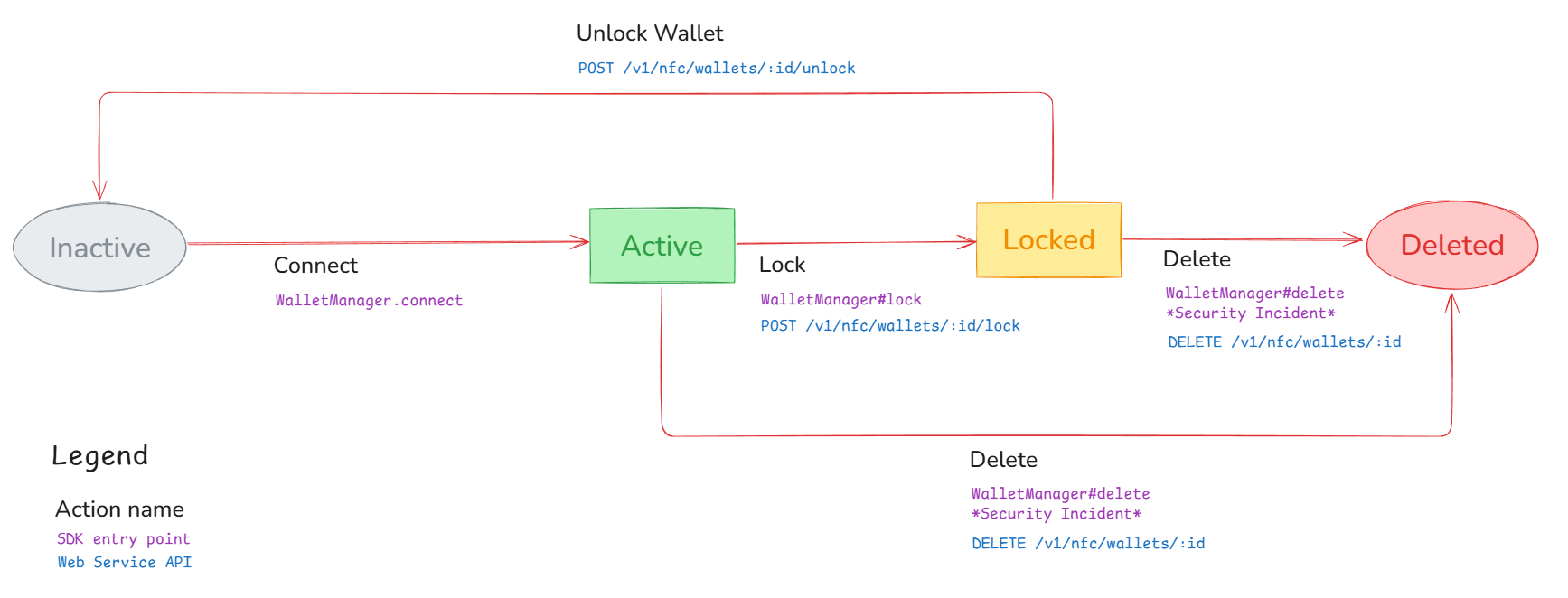
Lock a secure device wallet
You can lock a secure device wallet when you want to temporarily block payments and other functionalities of the wallet.
When a secure device wallet lock is initiated, the following process occurs:
- If the secure device wallet contains NFC payment cryptograms, they are suspended.
- The secure device wallet is also blocked in our backend from performing any operations.
- When the lock is initiated from your back office, we have the ability to send a secure push notification to immediately erase all sensitive data (payment cryptograms).
Even in the scenario where the push notification is not received by the secure device wallet real-time because the SDK is not accessible, our SDK is set up to retry connecting to our backend and as soon as it successfully connects, it will start the locking procedure.
There are two ways to lock a secure device wallet:
- customer lock: the locking action happens through the customer's device
- back office lock: the locking action happens by your back office through a server-to-server API call
Please note that a locked secure device wallet can only be unlocked by your back office
Customer Lock
walletManager.lock(reason);
Back office lock
Call the Lock API with a reason and reason_code.
The Lock API uses our Issuer base URL (see Environments).
{
    "reason_code": "suspected_fraud",
    "reason": "Requested by fraud team"
}
Unlock secure device wallet
The secure device wallet unlock should be initiated to resume the functionality of a locked wallet.
Secure device wallets can be unlocked only from the back office. On unlock, a push message is sent to the device to inform of its new status.
Call the Unlock API with a reason and reason_code.
The Unlock API uses our Issuer base URL (see Environments).
{
    "reason_code": "not_fraud",
    "reason": "Customer has been verified by fraud team"
}
Delete secure device wallet
The secure device wallet delete should be initiated when you decide to delete a secure device wallet.
A secure device wallet deletion cannot be undone
A deleted secure device wallet behaves as a locked one except that all information is wiped from the device and cannot be "undeleted".
There are 2 ways to delete a secure device wallet:
- customer delete: the delete action happens through the customer's device
- back office delete: the delete action happens by your back office through a server-to-server API call
Customer Delete
walletManager.delete(reason);
Back office delete
Call the Delete API with a reason and reason_code.
The Delete API uses our Issuer base URL (see Environments).
{
    "reason_code": "device_stolen",
    "reason": "Requested by fraud team"
}
Token update and transaction notifications
Open Fabric can send you the following notifications based on updates within a secure device wallet:
- Token activated notification: This notification is sent when an account or card was successfully tokenized and activated in the secure device wallet
- Token suspended notification: This notification is sent when the tokenized account or card is suspended in the secure device wallet
- Token deleted notification: This notification is sent when the tokenized account or card is deleted from the secure device wallet.
- Transaction authorization notification: This notification is sent when a transaction is authorized within the secure device wallet