Display a virtual card
Handling card details (PANs, Expiry date and and CVV) requires that you comply with the Payment Card Industry Data Security Standards (PCI DSS).
We support two ways to display virtual card details to your customers:
-
Retrieve card details via API (PCI scope) Your backend retrieves card details via API and displays it to the customer. Because your systems handle card data, this may place you in PCI DSS scope. Review your compliance requirements before choosing this option.
-
Use the card widget API (no card details in your systems) Your backend requests a short-lived widget URL and renders it in an iframe (web) or webview (mobile). Card details are displayed inside the widget, so card numbers do not need to flow through your frontend/backend systems.
Retrieve card details via API (PCI scope)
Retrieving card details via API happens in two steps:
- First you need to call our API to retrieve a card_fetch_token
- After this you can use the card_fetch_token to retrieve the card details securely
Retrieving a card fetch token
To use the Card Fetch Token API, please specify the static_token_id and account_id of the Virtual Card you wish to fetch. Additionally, you can optionally specify a public encryption key for us to encrypt the card details.
Sample request
- Without encryption
- With encryption
{
    "static_token_id":"c2319421-f0e8-4dd6-a099-124c5a3c6592",
    "account_id": "436605a1-271d-49a7-80f0-bcaf095cdd6a"
}
{
    "static_token_id":"c2319421-f0e8-4dd6-a099-124c5a3c6592",
    "account_id": "436605a1-271d-49a7-80f0-bcaf095cdd6a",
    "card_encryption_key": "-----BEGIN PUBLIC KEY-----\nMII…\n-----END PUBLIC KEY-----",
    "card_encryption_algo": "rsa_oaep"
}
Sample response
{
    "card_fetch_token":"eyJhbGciOiJIUzI1...adQssw5c",
}
Retrieving virtual card details
With the card_fetch_token, you can use Card Details API to fetch the sensitive card details (card number, expiry date and CVV). You can then present this information within a secure/restricted area (like logged-in page of your web-app or mobile-app).
Request access token with read card scope
It's recommended to use a separate access token to access card details. To request the new access token, set the scope parameter to card.r.
curl --request POST \
 --url https://auth.openfabric.co/oauth2/token \
 --header 'Authorization: Basic <Base64 Encoded Client Credentials>' \
 --header 'Content-Type: application/x-www-form-urlencoded' \
 --data 'grant_type=client_credentials' \
 --data 'scope=card.r'
Get Card Details
You can use the Card Details API to retrieve the card details directly.
The Card Details API uses our Issuer base URL (see Environments). Please be aware that your system might be subject to a higher level of PCI DSS certification if you use this method.
Sample request
{
    "card_fetch_token":"eyJhbGciOiJIUzI1...adQssw5c",
}
Sample response
- Without encryption
- With encryption
{
    "provider": "mastercard",
    "card_reference_id": "6b8fb780-9d21-4324-8671-e3e0a66fd4b8",
    "card_number": "5476...8601",
    "redacted_number": "************8601",
    "cvv": "7...",
    "expiry_month": "03",
    "expiry_year": "26"
}
{
    "provider": "mastercard",
    "card_reference_id": "6b8fb780-9d21-4324-8671-e3e0a66fd4b8",
    "encrypted_card_number": "VGhpc0lzQW5FbmNyeX……B0ZWRUZXh0",
    "redacted_number": "************8601",
    "encrypted_cvv": "ZW5jcnlw……dGVkQ1ZW",
    "expiry_month": "03",
    "expiry_year": "26"
}
Display card details using the card widget API
Use the card widget APIs to generate a short-lived, single-use widget URL for displaying card details (PAN, expiry, CVV) inside an iframe or webview. With this method no card details will touch your systems.
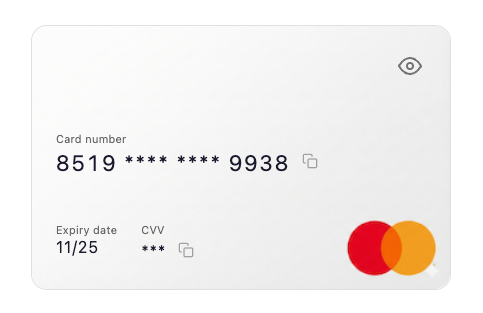
Step 1: Create a widget session
- API reference: Create card details widget
You can create a widget using either:
static_token_idcard_fetch_token
You can also customize the card art using either:
card_art_asset_id(recommended), orcard_art_base64+card_art_content_type(one-off)
Sample request
- With card fetch token
- With static token and Base64 card art
{
"card_fetch_token": "eyJhbGciOiJIUzI1...",
"card_art_asset_id": "7f3a2b1c-9d4e-5f6a-8b7c-0d1e2f3a4b5c"
}
{
"static_token_id": "6f3a2b1c-9d4e-5f6a-8b7c-0d1e2f3a4b5c",
"card_art_base64": "iVBORw0KGgoAAAANSUhEUgAAAVQAAADW...",
"card_art_content_type": "image/png"
}
Sample response
{
"card_widget_url": "http://example.com",
"expired_at": "2019-08-24T14:15:22Z"
}
Step 2: Render the widget URL in your frontend
Render the returned widget URL in an iframe (web) or webview (mobile).
<iframe
  src="WIDGET_URL_FROM_CREATE_CARD_WIDGET"
  title="Card details"
  style="width: 100%; height: 320px; border: 0;"
  allow="clipboard-write"
></iframe>
Optional: Manage card art assets
If you want to reuse card art across multiple widget sessions, use the card art asset APIs: