Card handover (reference integration guide)
This guide is for merchants and payment gateways that are PCI compliant and can fetch and process card details server-side.
With the card handover pattern, Open Fabric returns a one-time-use card credential for each approved transaction. Your backend fetches the card details and charges them using your existing card processing setup. Refunds are handled through your existing card flows.
If you are not PCI compliant, use the PG token handover guide instead.
If you prefer a direct API integration (no Web SDK), see Card handover (API-only).
Customer experience (example)
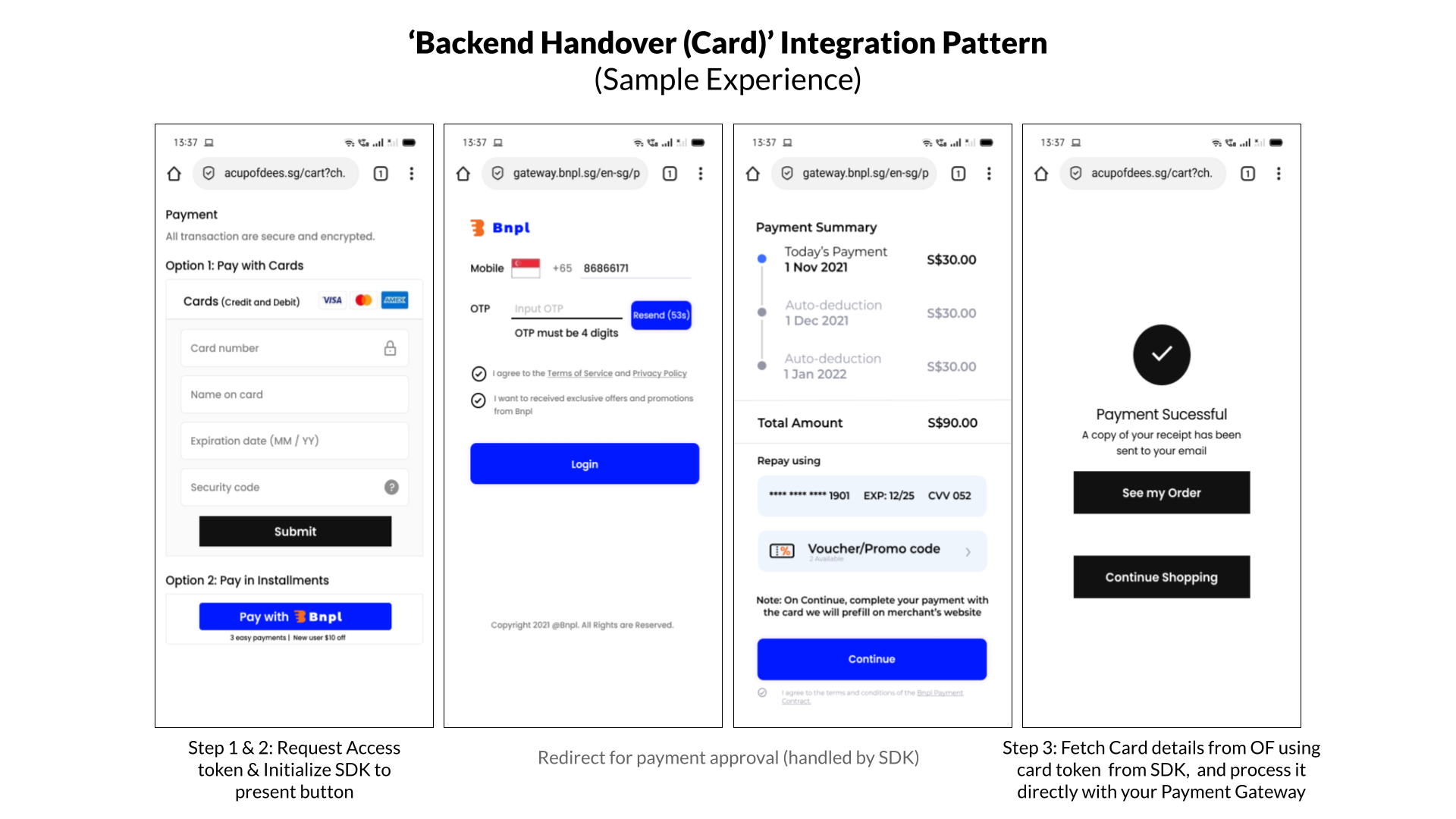
Flow and system interactions
Integration steps (overview)
| Step | Description |
|---|---|
| Step 1: Request access token | Your backend generates an access token using your Open Fabric credentials (client ID/secret). |
| Step 2: Initialize Merchant SDK (card handover) | Your checkout page includes and initializes the Open Fabric Merchant SDK. |
| Step 3: Fetch and process card | Your backend fetches the one-time card details and charges them using your existing card processing setup. |
Once the card is processed successfully, you can show the payment result to the customer.
7. Integration Steps - Deep Dive
Step 1: Request Access Token (Server-side)
Your backend generates an access token using your Open Fabric credentials (client ID and client secret). The access token is needed to initialize the Merchant SDK.
Note: Your client ID/secret are provided during onboarding. Sandbox and production use different credentials.
- NodeJS
- Java
- Curl
const request = require('request');

const options = {
  method: 'POST',
  url: 'https://auth.sandbox.openfabric.co/oauth2/token',
  headers: {
    'Content-Type': 'application/x-www-form-urlencoded',
    /*
     * Authorization header is base64 encoded value
     * of your clientId and clientSecret
    */
    Authorization: 'Basic dGVzdDp0ZXN0'
  },
  form: {
    grant_type: 'client_credentials',
    scope: 'txn.r txn.c'
  }
};

request(options, function (error, response, body) {
  if (error) throw new Error(error);

  console.log(body);
});
OkHttpClient client = new OkHttpClient();

MediaType mediaType = MediaType.parse("application/x-www-form-urlencoded");
RequestBody body = RequestBody.create(mediaType, "grant_type=client_credentials&scope=txn.r txn.c");
Request request = new Request.Builder()
  .url("https://auth.sandbox.openfabric.co/oauth2/token")
  .post(body)
  .addHeader("Content-Type", "application/x-www-form-urlencoded")
    /*
     * Authorization header is base64 encoded value
     * of your clientId and clientSecret
    */
  .addHeader("Authorization", "Basic dGVzdDp0ZXN0")
  .build();

Response response = client.newCall(request).execute();
#
# Authorization header is base64 encoded value
# of your clientId and clientSecret
#
curl --request POST \
  --url https://auth.sandbox.openfabric.co/oauth2/token \
  --header 'Authorization: Basic dGVzdDp0ZXN0' \
  --header 'Content-Type: application/x-www-form-urlencoded' \
  --data grant_type=client_credentials
  --data-urlencode 'scope=txn.r txn.c'
Note: The URL would be https://auth.openfabric.co/oauth2/token for production.
The response would be in the below format.
{"access_token": ACCESS_TOKEN }
Step 2: Initialize OpenFabric SDK for Card Handover (Client-side)
Initialize the Open Fabric Merchant SDK on your checkout page. You will need:
- Access token generated in Step 1
- Order/checkout details (amount, currency, items, addresses, your order reference)
2.1 Add dependency
Include the Open Fabric Merchant SDK JavaScript bundle.
<script type="module" src="https://unpkg.com/@openfabric/merchant-sdk@1.0.0/dist/index.umd.min.js">
</script>
Step 2.2 Add a payment method button
Add a button (or clickable element) that starts the Open Fabric flow, and wire its click handler.
<div id="payment-method-button">Pay with this payment method</div>
const paymentMethodButton = document.getElementById("payment-method-button");

openFabric.initialize().then(() => {
    paymentMethodButton.disabled = false;
});

paymentMethodButton.onclick = function () {
    if (paymentMethodButton.disabled) {
        return;
    }
    paymentMethodButton.onclick = null; // avoid double-click
    openFabric.startFlow();
};
2.3 Initialize OpenFabric SDK for Card Handover
Initializing OpenFabric SDK for Card Handover will require:
- An access token (generated in Step 1)
- Success and failure redirect URLs
- Order details (customer and address information, items, etc.)
Sample of initializing SDK is below.
// Import Config and FillConfig from our SDK
import { OpenFabric } from "@openfabric/merchant-sdk"

const openFabric = OpenFabric(
    access_token,
    "https://acme-merchant.com/payment-success",// Success redirect url
    "https://acme-merchant.com/payment-failed" // Failure redirect url
)
    .setEnvironment(Environment.production) // use Environment.sandbox to run test transactions.

const customer_info = {
    mobile_number: "+632 8855 8800",
    first_name: "John",
    email: "john.doe@gmail.com",
};
const item = {
    item_id: "P100-1222",
    name: "iPhone",
    variation_name: "Black, 128GB",
    description: "string",
    quantity: 1,
    amount: 1,
    price: 2100.50,
    original_price: 2300,
    categories: ["phone"],
};

const address_line_1 = "30th Street corner 11th Avenue Bonifacio Global City, Lane P, Taguig, 1634 Metro Manila";
const post_code = "1634";

const shipping_address = {
    country_code: "ph",
    address_line_1,
    post_code,
};

const billing_address = {
    country_code: "ph",
    address_line_1,
    post_code,
};

const partner_reference_id = "142134235" // Merchant’s transaction reference ID/Order ID.

openFabric.createOrder({
        customer_info,
        amount: 2100.50,
        currency: "PHP",
        partner_reference_id,
        transaction_details: {
            shipping_address,
            billing_address,
            items: [item], // When there are multiple items, the total of all item.price should add up to the amount above.
        },
});
Open Fabric’s Merchant SDK redirects the customer to the payment method’s approval flow when they click the payment button.
Step 3: Fetch and Process Card with Payment Gateway (Server-side)
When the payment method approves the transaction, Open Fabric generates a secure one-time-use virtual card for this transaction. A token that identifies this card (txn_card_token) is sent back to the partner via the redirect (and webhook notifications).
const queryParams = new URLSearchParams(window.location.search);
const card_token = queryParams.get("txn_card_token");
// Pass card_token to the backend
The Partner can fetch the virtual card details using the above token. To fetch the card details, they must authenticate again and get an access token. These are covered in steps 3.1 and 3.2 below.
Step 3.1. Generate a card-fetch access token
- NodeJS
- Java
- Curl
const request = require('request');

const options = {
  method: 'POST',
  url: 'https://auth.sandbox.openfabric.co/oauth2/token',
  headers: {
    'Content-Type': 'application/x-www-form-urlencoded',
    /*
     * Authorization header is base64 encoded value
     * of your clientId and clientSecret
    */
    Authorization: 'Basic dGVzdDp0ZXN0'
  },
  form: {
    grant_type: 'client_credentials',
    scope: 'card.r'
  }
};

request(options, function (error, response, body) {
  if (error) throw new Error(error);

  console.log(body);
});
OkHttpClient client = new OkHttpClient();

MediaType mediaType = MediaType.parse("application/x-www-form-urlencoded");
RequestBody body = RequestBody.create(mediaType, "grant_type=client_credentials&scope=card.r");
Request request = new Request.Builder()
  .url("https://auth.sandbox.openfabric.co/oauth2/token")
  .post(body)
  .addHeader("Content-Type", "application/x-www-form-urlencoded")
    /*
     * Authorization header is base64 encoded value
     * of your clientId and clientSecret
    */
  .addHeader("Authorization", "Basic dGVzdDp0ZXN0")
  .build();

Response response = client.newCall(request).execute();
#
# Authorization header is base64 encoded value
# of your clientId and clientSecret
#
curl --request POST \
  --url https://auth.sandbox.openfabric.co/oauth2/token \
  --header 'Authorization: Basic dGVzdDp0ZXN0' \
  --header 'Content-Type: application/x-www-form-urlencoded' \
  --data-urlencode  'grant_type=client_credentials' \
  --data-urlencode 'scope=card.r'
Step 3.2. Fetch Card Details with Card Fetch accessToken
- NodeJS
- Java
- Curl
var request = require('request');
var options = {
  'method': 'POST',
  'url': 'https://issuer.sandbox.openfabric.co/i/fetchCard',
  'headers': {
    'authorization': 'Bearer <access_token from 3.1>',
    'dnt': '1',
    'content-type': 'application/json',
  },
  body: JSON.stringify({
    "card_fetch_token": "< card_token handover from FE>"
  })

};
request(options, function (error, response) {
  if (error) throw new Error(error);
  console.log(response.body);
});
OkHttpClient client = new OkHttpClient().newBuilder()
  .build();
MediaType mediaType = MediaType.parse("application/json");
RequestBody body = RequestBody.create(mediaType, "{\"card_fetch_token\":\"<card_fetch_token>\"}");
Request request = new Request.Builder()
  .url("https://issuer.sandbox.openfabric.co/i/fetchCard")
  .method("POST", body)
  .addHeader("authorization", "Bearer <access_token from 3.1>")
  .addHeader("content-type", "application/json")
  .build();
Response response = client.newCall(request).execute();
curl --location --request POST 'https://issuer.sandbox.openfabric.co/i/fetchCard' \
--header 'authorization: Bearer <access_token from 3.1>' \
--header 'content-type: application/json' \
--data-raw '{"card_fetch_token":"<card_token handover from FE>"}'
Step 3.3. Process virtual card with Payment Gateway
Charge the virtual card using your existing payment gateway or card processing backend.
Note: If the customer declines (or the payment method rejects) a transaction, Open Fabric redirects to the failure URL configured during SDK initialization. You should present other ways to pay.
To issue refunds, initiate a refund against the card through your payment gateway/card processor (same as any card refund).
8. Test and Go Live
- Your client ID/secret are provided via the Open Fabric portal (sandbox and production are different).
- Use sandbox credentials to test against sandbox, and production credentials to run against production.