Notifications
Our notification systems send you real-time updates to your systems as they get generated. Open Fabric expects all notifications to be acknowledged with a 2xx HTTP Status Code and in the absence of which we will retry the notification.
In this section you can find further details on how you can implement webhook endpoints to consume our notifications and understand how our failed notification retry works.
Notification delivery method
Open Fabric sends notifications to you via POST requests to a pre-configured webhook endpoint defined by your system. This endpoint should be able to handle a dynamic request body to serve as a receiver for multiple types of notifications.
You can set up your notification endpoint during the onboarding process. You only need to set up one endpoint for all notifications you receive from Open Fabric
Notifications can be sent in batches (as an array of notification objects), or as individual notification objects, depending on your webhook configuration.
Endpoint: As configured by you
Method: POST
Authentication Custom header with shared API key, as configured by you
Notification Request Body
| Name | Type | Description |
|---|---|---|
| notification_id | UUID | Notification ID |
| type | String | Notification Type Example: v1:pba:transaction:final_auth_reversedThe first section of the type indicates the version number of this notification payload. |
| created_at | String | Notification creation timestamp, in ISO 8601 Date Time format |
| data | String | Notification Payload The schema of data depends on the notification type |
Sample Notification Requests
- Batch Mode
- Individual Mode
[
        {
        "notification_id": "8bedf365-8442-4b6e-a480-7dad7b40ac44",
        "type": "v1:pba:transaction:final_auth_reversed",
        "created_at": "2023-06-24T14:15:22Z",
        "data": {
            "notification_id": "8bedf365-8442-4b6e-a480-7dad7b40ac44",
            "transaction_id": "6182bde8-ee3e-4bd5-935e-e56507e0f809",
            "tenant_reference_id": "31XXXX6723173606",
            "network_transaction_ref": "awqcB1rPDuJIm4yKOQbqJUj5MvpdcH6E",
            "network_message_ref": "CZLIzgNfeyMCabcsXp3liJPgSVGyQypHI2B",
            "amount": 10.0,
            "currency_code": "SGD",
            "billing_amount": 10.0,
            "billing_currency_code": "SGD",
            "billing_exchange_rate": 1.0,
            "settlement_amount": 10.0,
            "settlement_currency_code": "SGD",
            "settlement_exchange_rate": 1.0
        }
    },
    {
        "notification_id": "8bedf365-8442-4b6e-a480-7dad7b40ac44",
        "type": "v1:pba:transaction:pre_auth_reversed",
        "created_at": "2023-06-24T14:15:22Z",
        "data": {
            "notification_id": "8bedf365-8442-4b6e-a480-7dad7b40ac44",
            "transaction_id": "6182bde8-ee3e-4bd5-935e-e56507e0f810",
            "tenant_reference_id": "31XXXX6723173607",
            "network_transaction_ref": "awqcB1rPDuJIm4yKOQbqJUj5MvpdcH6E",
            "network_message_ref": "CZLIzgNfeyMCabcsXp3liJPgSVGyQypHI2C",
            "amount": 50.0,
            "currency_code": "SGD",
            "billing_amount": 50.0,
            "billing_currency_code": "SGD",
            "billing_exchange_rate": 1.0,
            "settlement_amount": 50.0,
            "settlement_currency_code": "SGD",
            "settlement_exchange_rate": 1.0
        }
    }
]
{
    "notification_id": "8bedf365-8442-4b6e-a480-7dad7b40ac44",
    "type": "v1:pba:transaction:final_auth_reversed",
    "created_at": "2023-06-24T14:15:22Z",
    "data": {
        "notification_id": "8bedf365-8442-4b6e-a480-7dad7b40ac44",
        "transaction_id": "6182bde8-ee3e-4bd5-935e-e56507e0f809",
        "tenant_reference_id": "31XXXX6723173606",
        "network_transaction_ref": "awqcB1rPDuJIm4yKOQbqJUj5MvpdcH6E",
        "network_message_ref": "CZLIzgNfeyMCabcsXp3liJPgSVGyQypHI2B",
        "amount": 10.0,
        "currency_code": "SGD",
        "billing_amount": 10.0,
        "billing_currency_code": "SGD",
        "billing_exchange_rate": 1.0,
        "settlement_amount": 10.0,
        "settlement_currency_code": "SGD",
        "settlement_exchange_rate": 1.0
    }
}
IP addresses to whitelist
When restricting incoming traffic to your webhook endpoint, whitelist the following Open Fabric source IP addresses:
| Environment | IP address(es) |
|---|---|
| Sandbox | 3.0.76.215 |
| Production | 13.213.252.32, 52.77.57.181 |
Automatic retries for failed notifications
In the scenario where you did not acknowledge our notifications (with a 2xx HTTP Status code - response body is not required), Open Fabric will employ an exponential retry strategy to redeliver the notification, capped at a maximum of 20 attempts.
Our retries schedule is as follows:
| Attempt | Delayed Seconds |
|---|---|
| 1 | 0 |
| 2 | 30 |
| 3 | 78 |
| 4 | 154.800 |
| 5 | 277.680 |
| 6 | 474.288 |
| 7 | 788.861 |
| 8 | 1292.177 |
| 9 | 2097.484 |
| 10 | 3385.974 |
| 11 | 5447.558 |
| 12 | 8746.093 |
| 13 | 14023.749 |
| 14 | 22467.998 |
| 15 | 35978.797 |
| 16 | 57596.075 |
| 17 | 92183.720 |
| 18 | 147523.953 |
| 19 | 236068.324 |
| 20 | 377739.319 |
Webhook notification implementation guideline
In this section, We will discuss an example architecture to implement a HTTP endpoint to receive notifications from Open Fabric which is fault tolerance and high availability. This architecture will involve a REST API framework (Express.JS), a message queue broker (ActiveMQ), a queue consumer written in Node.js to consume notification messages, and a Postgres database to store the notification messages.
- Setting up the Express.js: Start by creating a new Express.js project by setting up necessary middlewares and routes using Express Route. The external system will be able to send HTTP notifications to these routes. When the Express.js application receives a notification, it should validate the data and then send it to ActiveMQ.
- Integrating ActiveMQ: Set up ActiveMQ which will act as the message broker in the architecture. Create a topic or queue in ActiveMQ. Once an http request hits Express.js application, the message from the http request is published to a corresponding queue on ActiveMQ based on the Notification type.
- Creating Message Consumer: Create a Node.js application that will act as the consumer of the messages published to the ActiveMQ queue. Using the STOMP or AMQP protocol, connect the Node.js application to ActiveMQ and subscribe it to the topic/queue to which Express.js is publishing. Whenever a new message is published to the topic/queue, this Node.js application should consume the message.
- Process and Save Notifications to Postgres DB: Once the Node.js application consumes messages from the ActiveMQ topic/queue and processes it, you should save those notifications to the PostgreSQL database for future debugging. To do this, set up a connection to the PostgreSQL database using a library (Node.js) such as
pg-promiseornode-postgres. Then save the notification payload to a table corresponding to its type. - Implementing Error Handling and Fault Tolerance: You should set up multiple queue consumer instances to consume messages from the ActiveMQ to mitigate the risk of a single point of failure. If one instance of the consumer Node.js application fails, the Notification message will not be acknowledged. After that other instance will be able to consume and process that Notification message. Implement logging and error handling mechanisms in all stages of this data flow, so if anything fails, it can be easily diagnosed and fixed. You must always run at least 2 instances of Express.js API server to ensure High Availability. And remember to define HA-Policies for your ActiveMQ cluster configuration.
- Security Considerations: Secure your system by using HTTPS for your Express.js endpoints. Apply proper user authentication and authorization before the external system can send notifications to your Express.js endpoints. Ensure that your connection to ActiveMQ and PostgreSQL is secured and cannot be accessed by unauthorized parties.
The diagram below will help understand a sample architecture for the webhook notification endpoint implementation on your end.
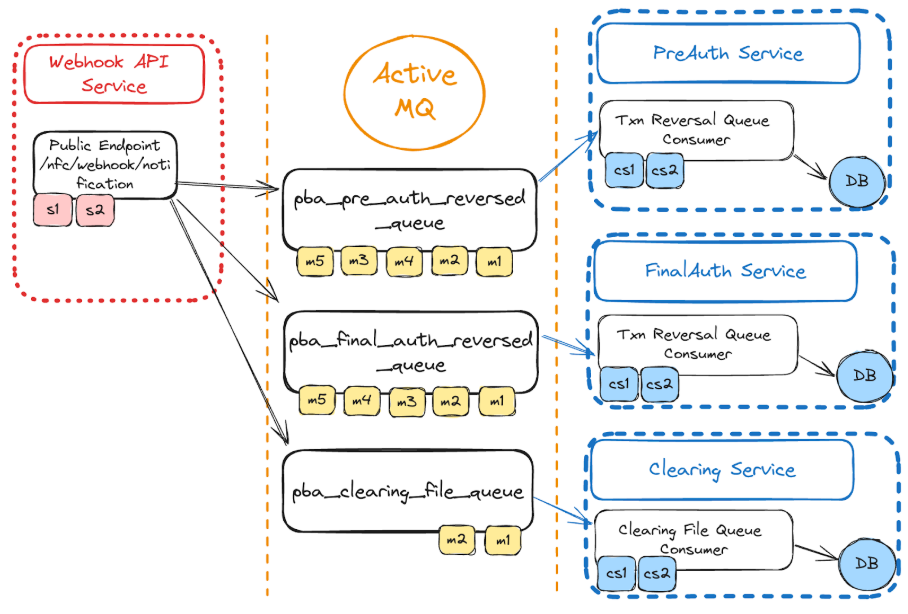
This is a high-level overview of the architecture. There should be additional components and processes may need to be involved as well. For example: A Ledger Service to handle query/update the customer credit balance and on-hold balance. A File Fetching Service to download the clearing files from Open Fabric (SFTP or AWS S3)